 Track Icons for Sibelius
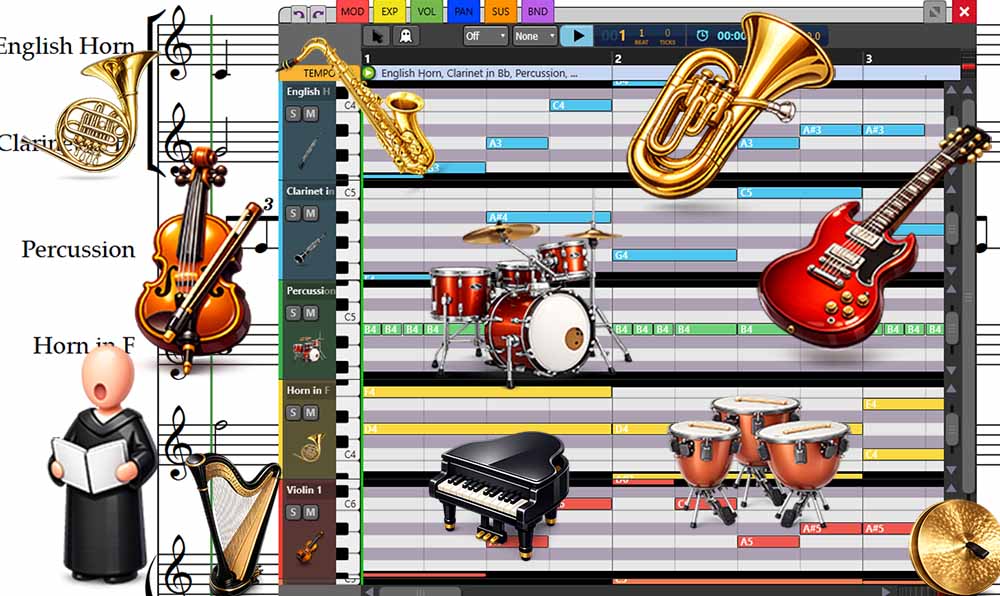
With the new track icons, each staff can have a visual icon that makes it easier to identify instruments at a glance.
The first collection includes dozens of icons designed for orchestral, band, and jazz arrangements, making it easier to navigate complex scores and quickly realize the staff you are working with.

Other Improvements in GMT 2026.08
Alongside track icons, this release includes several improvements to the MIDI editing workflow.
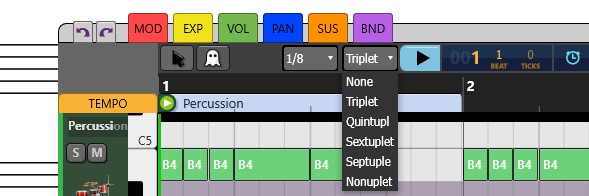
Triplet and Tuplet Grid Snapping
The Grid now supports triplet and tuplet snapping, giving you more control when editing MIDI events that don't fall on standard binary subdivisions.
Quickly Disable the Grid
Holding CTRL temporarily disables the Grid, making it easier to make precise adjustments without changing your grid settings.
Open Multiple Tracks Without Shrinking Them
You can now open multiple tracks without having them progressively shrink to fit the available space.
A global vertical scroll lets you navigate through all the open tracks instead, giving you more room to work while still allowing you to move easily between them.
Get Graphical MIDI Tools
Graphical MIDI Tools lets you create and edit realistic performances directly from your Sibelius score, giving you detailed control over MIDI expression without leaving your notation workflow.